MQTT API Overview
The EnOcean SmartStudio MQTT Interface provides a powerful and flexible way for applications to integrate with devices using the lightweight MQTT protocol. This interface enables seamless integration of EnOcean IoT devices with various third-party systems by allowing device data to be published and subscribed to in real-time.
Overview
The MQTT API supports two modes of operation:
- MQTT Client: EnOcean SmartStudio acts as an MQTT client, publishing data to an MQTT broker and allowing clients to subscribe to predefined topics for telemetry, events, stats, and RPC commands/results.
- External MQTT Broker: EnOcean SmartStudio can connect to an external MQTT broker, enabling the use of custom topics for telemetry, events, stats, RPC commands, and RPC results.
This flexibility allows seamless integration with both internal and external systems, depending on your requirements.
MQTT Client
The MQTT Client mode allows EnOcean SmartStudio to act as a client, publishing data to an MQTT broker. Clients can subscribe to predefined topics to receive updates.
MQTT Topics
Important
To start receiving data, you must subscribe to the relevant topics under <your-MQTT-username>/#. For example:
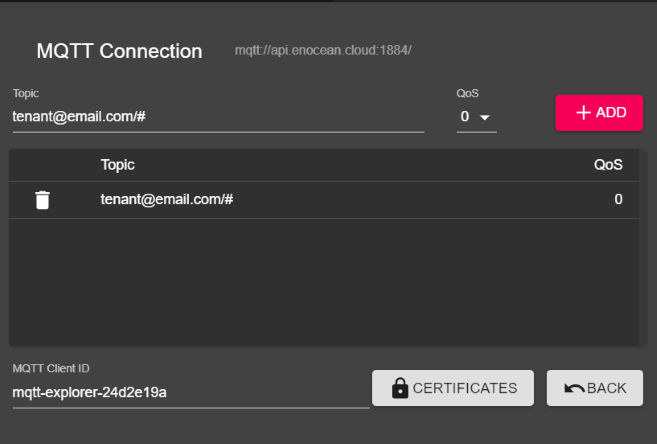
EnOcean SmartStudio specifies the topics below for MQTT:
| PATH | Description |
|---|---|
tenant@email.com/v0/sensor/[ID]/telemetry |
EnOcean device telemetry of a specific [ID]. Publishing is done every time a valid telegram is processed. Payload consists of a JSON file described here. |
tenant@email.com/v0/sensor/[ID]/meta/event/ |
Event information of a specific [ID]. Publishing is done with a specific event. Reference of possible events and content of JSON files can be found here. |
tenant@email.com/v0/sensor/[ID]/meta/stats/ |
Statistical information about traffic of a specific [ID]. Publishing is done in predefined time intervals of 10 minutes. Published JSON Payload can be reviewed here. |
tenant@email.com/v0/device/[ID]/rpc/command |
Topic for queuing new commands. |
tenant@email.com/v0/device/[ID]/rpc/cancel |
Topic for deleting waiting commands. |
tenant@email.com/v0/device/[ID]/rpc/result |
Topic for results of requests. |
Note
All timestamps in EnOcean SmartStudio are in Unix epoch time. It can be converted into a human-readable format using tools like this online converter.
External MQTT Broker
The External MQTT Broker mode allows EnOcean SmartStudio to connect to an external broker, enabling the use of custom topics for telemetry, events, stats, RPC commands, and RPC results.
Key Features
- Custom Topics: Define your own topic structure for telemetry, events, stats, and RPC communication.
- Broker Flexibility: Integrate with any external MQTT broker that supports standard MQTT protocols.
- TLS Support: Secure communication with the broker using TLS authentication and certificate validation.
Configuration
- Navigate to the MQTT Settings in the SmartStudio Web Management UI.
- Enable the External Broker option.
-
Enter the following details:
- Broker URL: The URL of your external MQTT broker.
- Port: The port used by the broker (default:
1883or8883for TLS). - Username: Your MQTT broker username.
- Password: Your MQTT broker password.
- Custom Topics: Define the topics for telemetry, events, stats, RPC commands, and RPC results.
Note
Ensure that the external broker is configured to accept connections from EnOcean SmartStudio.
-
Save the configuration and verify the connection status.
Summary
The MQTT API provides flexibility for integrating EnOcean SmartStudio with third-party systems. Whether you use the built-in MQTT client or connect to an external broker, the interface ensures seamless data exchange for telemetry, events, stats, and RPC communication.