Aruba Integration Overview
The EnOcean integration with Aruba allows seamless communication between EnOcean IoT devices and Aruba's network infrastructure, enabling businesses to manage IoT data using their existing Wi-Fi setup. Wireless, self-powered EnOcean sensors transmit data through an EnOcean USB stick connected to Aruba’s Wi-Fi Access Point, which forwards the data to the EnOcean SmartStudio. This integration lets companies leverage their current IT infrastructure to incorporate IoT sensors into their network, while maintaining full compliance with security standards, thanks to Aruba’s robust security features.
The EnOcean integration with Aruba supports the following Aruba network architectures:
Prerequisites
The following prerequisites are required for EnOcean integration with Aruba:
Aruba Access Point (AP) with USB port
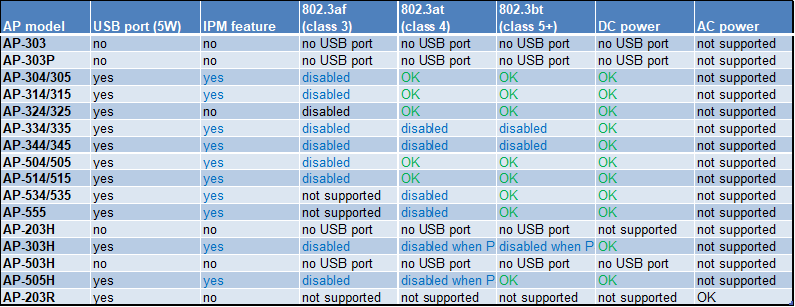
Ensure the Aruba AP meets the necessary energy requirements to properly power the USB port.
EnOcean USB dongle
Current Versions:
| USB revision | Aruba OS 8 | Aruba OS 10 |
|---|---|---|
| USB 300 DE-13 | AOS 8.10.0.13 / AOS 8.12.0.1 + | Supported* |
| USB 500U DB-06 | AOS 8.10.0.0 + | Supported* |
| USB 400J DD-11 | AOS 8.10.0.13 / AOS 8.12.0.1 + | Supported* |
| USB 500J DB-02 | AOS 8.10.0.0 + | Supported* |
Previous Versions:
| USB revision | Aruba OS 8 | Aruba OS 10 |
|---|---|---|
| USB 300 DE-12 | AOS 8.10.0.0 + | Supported* |
| USB 300 DC | AOS 8.10.0.0 + | Supported* |
| USB 300 DD | AOS 8.10.0.0 + | Not supported |
| USB 500U DB-05 | AOS 8.10.0.0 + | Supported* |
| USB 500U DA | AOS 8.10.0.0 + | Supported* |
| USB 500J DA-01 | AOS 8.10.0.0 + | Supported* |
| USB 400J DD-09 | AOS 8.10.0.0 + | Supported* |
| USB 400J DD-10 | AOS 8.10.0.13 / AOS 8.12.0.1 + | Supported* |
Note
-
- Minimum AOS 10.8 is required for running the EnOcean SmartStudio App in AP as connector mode.